Blog, HDR, Tips, Urbex

Why HDR pt2-For effect

Title-‘For Vincent’

  In a previous post I showed the practical benefits of using HDR to help achieve a better representation of a scene when contrast levels exceed that of the cameras capability. This time I’ve chosen to show how you can use HDR software to give your pictures a much more painterly look.

This area of photography has come under much criticism over recent years and I for one have become rather fed up with it as ultimately is all rather pointless, in fact the argument doesn’t differ too much from what the impressionist painters went though during the 19th century, or indeed the modern artists of today. It simply comes down to this: It’s your art, do it how you want to do it. Don’t let anyone tell you any different. If it’s not your thing, fair enough, ignore it and move on.

Anyhow, let continue…

As explained previously, you will ideally still be bracketing your exposures when out shooting, but you can create this look by making a pseudo HDR image out of one shot if there is a good tonal range running throughout. The difference between making a picture look realistic or painterly has a lot to do with how you set the smoothness slider (assuming your using Photomatix), so in this instance you’ll be wanting to set it more to the left, if not all the way to to the left. There is no hard and fast rule as to how you set all of the other sliders so it’ll be just a case or trial and error as every picture will react in slightly different ways, so play around with all of them to see what happens. For this reason it is always best to have the software reset everything when starting a new project.

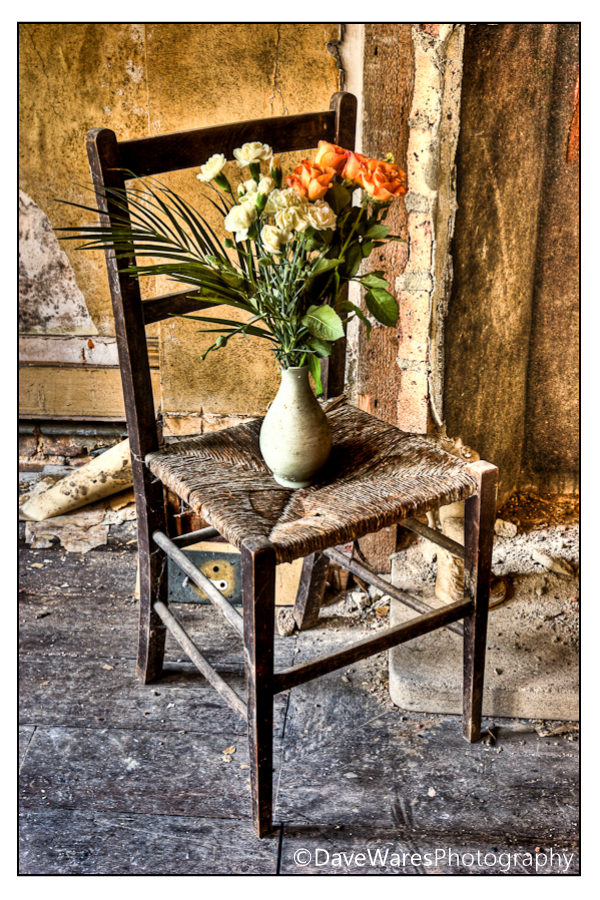
In my opinion it’s still desirable to avoid getting halos, but the main objective is to get the dark and light areas to a pretty even level. So that’s really all there is to it. What you’ll end up with is something that (to me at least) looks a lot more impressionistic. This is exactly what went through my mind when I was out on an urbex shoot last year and came across this chair, it immediately screamed of  Vincent van Gogh’s Chair and I set about doing my own take with the vase of flowers.

So have fun with your photography and try something new.

Thanks for stopping by.

Blog, HDR, Tips, Urbex

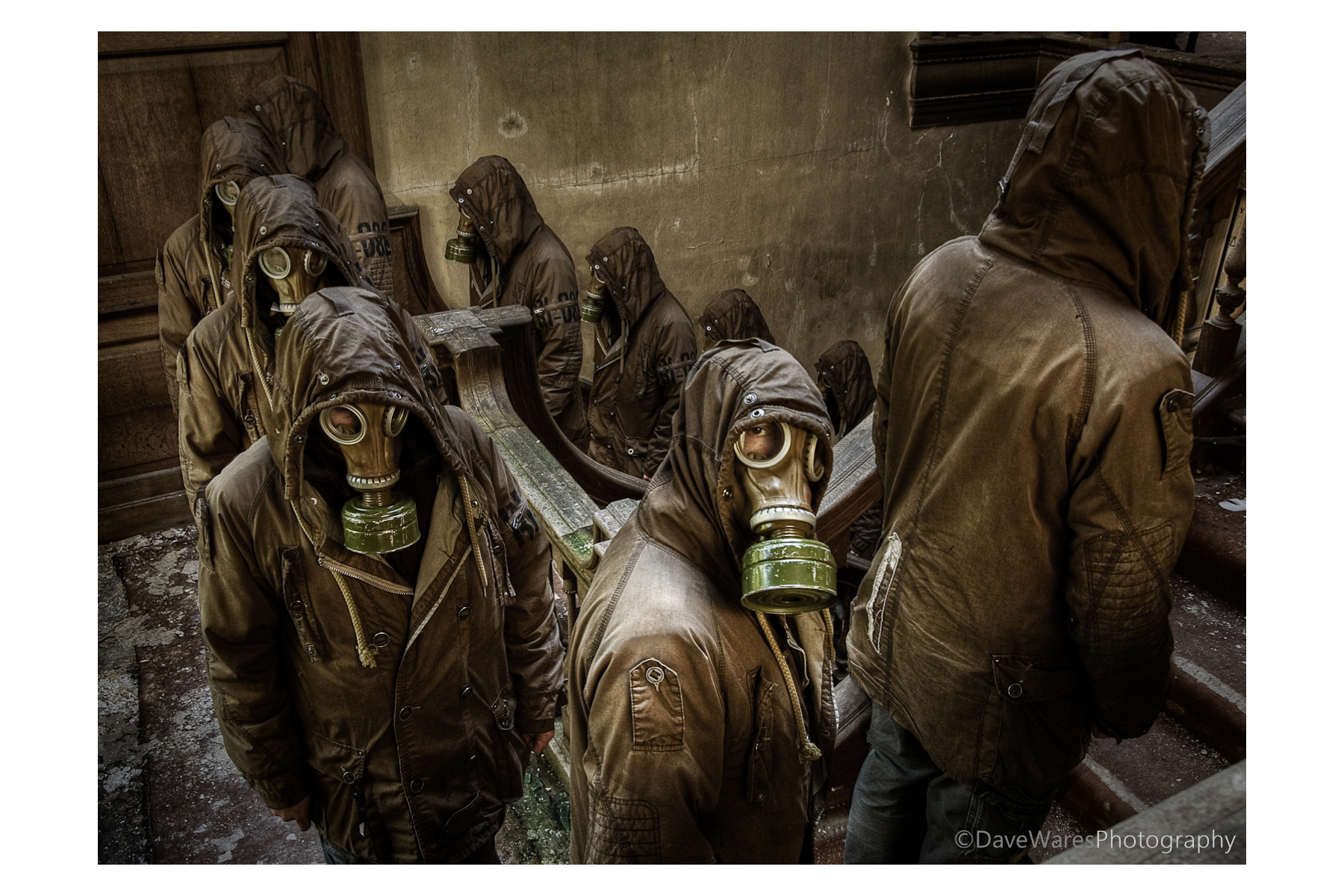
Multiplicity- The making of ‘We are one’

Some people have been asking me about how I went about producing this shot, so I’ve finally got round to doing a post on it.

About a year ago (almost to the day) during an urban exploration shoot I took a series of photographs to create a sort of surreal image of a bunch of sinister looking figures ascending the main staircase. That sinister figure was to be me in that ever popular urbex accessory, the gas mask. I had been to this location once before and between visits I was pondering different ways of making an interesting picture. Having knowledge of the location I knew exactly where to place the camera and though my initial thought was to have me on each step, I decided that it would probably become too cluttered and so decided to stand on every other step instead. It wasn’t until a couple of months later that I would actually attempt to put all the shots together.

People have been doing multiplicity shots for years and I think it’s something everyone tries out at some time or another. The process itself is actually quite straight forward, though it can become rather time-consuming depending on how many people you want in the final result. As with any kind of photography it always works best if you have a decent idea or point to the picture rather than doing one for the sake of the process, if that makes sense.
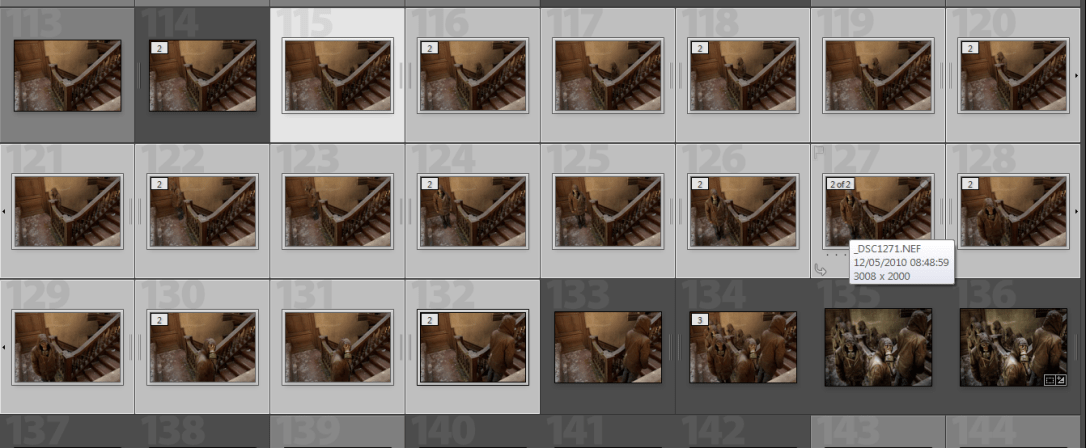
So here’s how to do it.

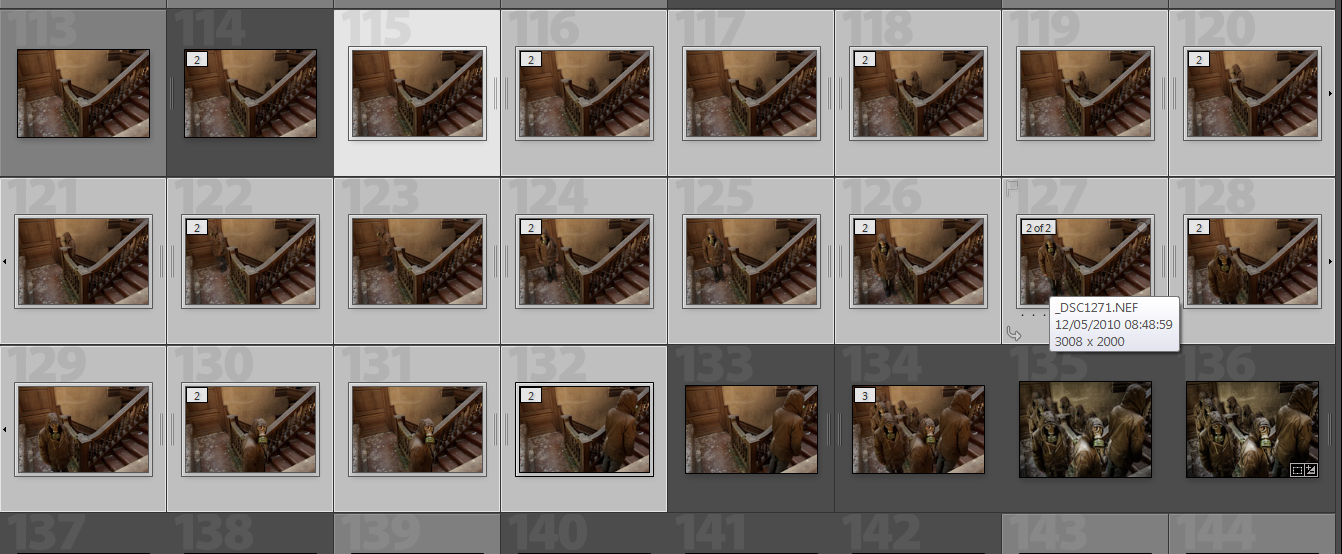
First set up the camera on a tripod and switch the camera to manual exposure mode as you want consistent exposures throughout the shots, then set the shutter to remote self timer. Next is choosing where to focus and what aperture you’ll want. You’ll most probably be using a wider angle so you’ll be able to get away with a much more shallow depth of field, this will in turn increase the shutter speed and help to avoid recording any unwanted movement, especially in lower light situations such as in my shot. In this shot I decided that I wanted to have the focus primarily of the figure facing the camera, so with the autofocus still on and remote in hand I took a test shot standing in the centre of the scene. Once this shot was taken I went back to the camera and switched the focus to manual thus keeping it focused in the right place. So now we have the camera in total manual control so each of the shots exposure and focus will be exactly the same. This is very important when it comes to merging them all together later. Then I just had to get into position, press the shutter (on timer) and as soon as I heard it click move to the next position, and so on.

So what you’ll end up with is a series of shots as you see in the picture above.

At this point I did no processing at the RAW stage, we want to keep total consistency and so I merged the shots before doing any post processing in terms of  exposure or colour etc. The next this is to bring the shots into Photoshop or similar software with a layers capability. You can bring them all in at once or, as I did, bring only a couple in at a time. This was just for my own benefit so I didn’t get confused.

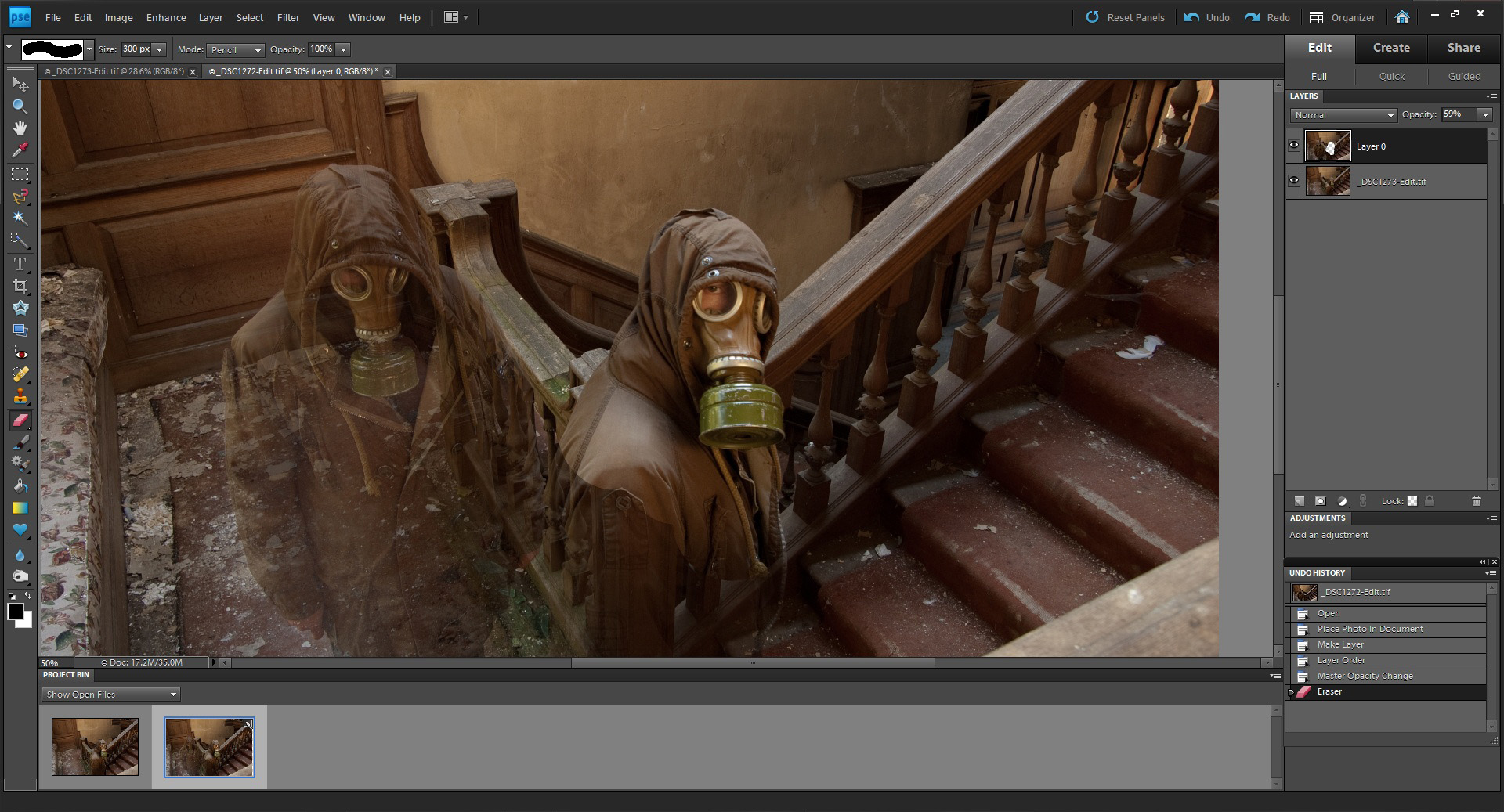
If you have overlapping people then make sure you have the layers set so that the furthest figure is set as the bottom layer (to unlock a background layer just double click on it, a box will appear, just click OK). Click on the top layer and reduce the opacity to around 60%, you should now see both figures as in the picture above. Zoom in as much as you like and grab the eraser tool then start to rub through over your figure. Try to be as careful as you can but if you slightly go over the edges it shouldn’t matter too much as all your shots are exposed the same. Of course you can always go back a step with the history palette.

Once you’ve revealed all of your figure change the opacity back to 100% and checking it all looks good, right-click on the top layer and merge the layers. Bring in the next image as a layer and repeat the process.

Tip: If you have all your images in the project bin (as seen here in Photoshop Elements9) you can simply drag an image onto the main one to add as a layer.

Once all ten of my images were together I then imported them back into Lightroom to make my tonal adjustments and a slight crop to tighten the composition. In addition to this I decided to tonemap it in Photomatix to give added drama and grunge. You can see the difference in the thumbnails on the lower right in the middle shot.

And there you have it. This has probably been my most well received shot to date and I was very happy indeed when it was chosen ‘Best image’ at the Sussex Federation DPI competiton this year.

I hope this has been of some use to some of you, I know there are a number of tutorials out there on this subject but this is how I go about it.

Thanks for looking and happy shooting.
Blog, HDR

Pett level Pillbox

This past Tuesday our camera club met up at Pett level for an evenings spot of photography along the beach. However, even though throughout the day we’d been blessed with blazing sunshine it didn’t end up giving us (or at least me) that wonderful golden light I’d been hoping for. It just seemed a bit lifeless and just a little too hazy to get anything half decent. Heading up from the beach towards the houses I bumped into another club member and we decided it might be a better idea to head up towards the old World War 2 pillbox. A very good decision this turned out to be too, with just enough golden light hitting the bickwork.

This is one of my favourites from the eve but I took a couple of others both inside and out of this building.  The part you see here is the lookout, but there is also another section that was used for the gun emplacements that we didn’t get to. Another visit me thinks.

A very pleasant evening had by all, rounded off with a nice chat in the pub too. 🙂

Blog, HDR

The Double Plushie Murder

Our camera club decided to do a photowalk at Hastings old town last Tuesday night instead of meeting at the hall, though to be honest it was a little too early in the year as the light had already gone so we were just left with  street and flood lights. Though this is not altogether a bad thing, it would’ve been nice to have an hour or so of the last of the evening light to work with, especially as there are a number of beginners in our group. I didn’t get to take as many pictures as I would’ve liked because, as expected, I ended up helping out a couple of others with their cameras; which I am happy to do. It was a pleasant evening that turned into more of a social event, with a nice chat and a pint in the local angling club to wind the evening up.

This shot was taken on the beach where fishing boats, net houses(unique to Hastings), bulldozers and various other fishing paraphernalia can be found. These sorry looking teddies were hanging on the back of one of the dozers.


Blog, HDR, Urbex

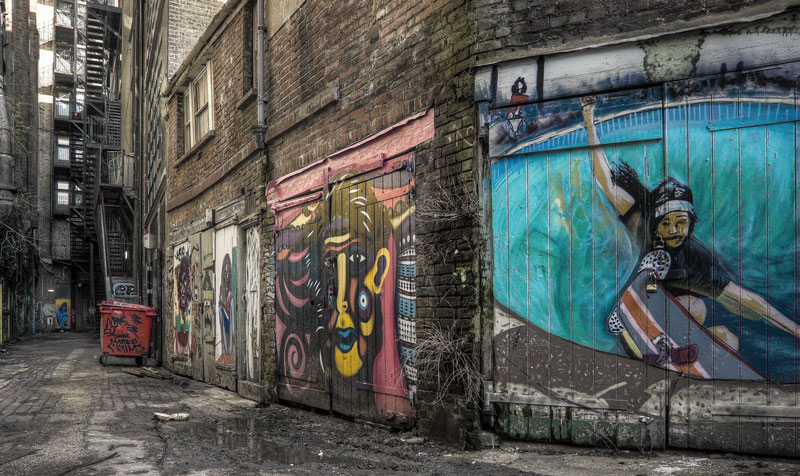
Art Alley

‘Art Alley’ HDR 3exp +/-2EV ISO200 Sigma18-50mm EX f2.8. Photomatix, Lightroom and Photoshop Elements used.

Another shot from round the back of the public library, only this time taken further back. A fair bit has gone into working on this one, mainly in terms of desaturating all of the brickwork and then bringing the colours back into the graffiti. Another thing I chose to do was to correct the perspective as my low camera position and wide angle led to some converging verticals, a process easily done in Photoshop using the transform tool.

On another note; the Holga Nikon mount lens I ordered last Friday has been delayed due to to an ‘unexpected amount of orders’ . Hopefully it won’t be too long before I receive it, I’ll think I’ll do a mini review. A perfect excuse to get out with the camera.


Blog, HDR, Holga, Urbex

We all die in the end+New Holga lenses

‘We all die in the end’. HDR 3exp +/-2EV iso800 for added grain. Produced using Photomatix and Lightroom.

So, two subjects in one post. I think I can pull it off.

Going back through some more recent shots I came upon a set of brackets that I was really rather taken with, and instantly though of giving the picture a more sombre muted look. Sometimes a scene will give you a certain feel that if the natural colours were kept, that feel would be lost, at least to a certain extent. I particularly like using muted colours, it’s  something you also see done a lot in modern war movies, which helps with the overall impact.

Now; being the sort of chap who’s a bit of a fan of gritty/grainy pictures, both in colour and black and white, I was rather pleased to read that camera manufacturer Holga has now produced a lens with both Canon and Nikon mounts. And they so cheap too, meaning that unless you’re a stickler for tack sharp images, then there’s absolutely no reason not to own one of these. There has been a big surge in recent times towards older film based cameras that give less than perfect results, and yet they somehow manage to evoke a look and feel that appeals to a lot of us photographers. Some of the look Holga images have is down to how the film is processed too, but I think this is a good compromise for those who do not wish to go back to using film.  I ordered mine yesterday and I’m counting the minutes till it drops through the letterbox. In addition to this, the new Holga lenses are fully compatible with their current range of lens accessories. I’m really looking forward to getting that Holga look straight out of the camera rather than having to mimic it in Photoshop or plug-in filters; the same reason I bought my Lensbaby Muse not so long ago. Watch this space!